WineCore Guide · QR Menu
How to create a QR code for a restaurant menu: step-by-step guide
Creating a QR code for a restaurant menu is one of the fastest ways to digitize the guest experience. The guest sits down at the table, scans the code with their phone and accesses the menu directly, with no need to wait for the floor team to hand over a physical copy.
At first glance it looks very simple: upload the menu as a PDF, generate a QR code, print it and place it on the tables. And yes, technically it can be done that way. But if the restaurant's goal is to improve the guest experience, update the menu easily and sell better, it is worth going one step further.
A QR code should not just be quick access to a static PDF. Done well, it can become the gateway to a clearer, more visual, always up-to-date digital menu — and even an interactive one.
In this guide we will look at how to create a QR code for a restaurant menu step by step, what options exist, which mistakes to avoid and when it is worth moving from a static menu to a more advanced digital experience.
What you will find in this guide
- What a menu QR code is
- Why use a QR code on your menu
- PDF, web page or interactive digital menu
- How to create the QR step by step
- Where to place the QR
- What text to put next to the QR
- Common mistakes
- The limits of a static QR menu
- When to switch to an interactive menu
- QR codes for wine lists
- The WineCore experience
- Downloadable checklist
- Example structure
- Frequently asked questions
Fundamentals
What is a QR code for a restaurant menu
A restaurant menu QR code lets the guest access the menu from their phone. When they scan it with the camera, they land on a web page, a PDF, a digital menu or an interactive platform.
The way it works is very simple:
The restaurant creates a digital version of its menu
The menu is uploaded to a URL
A QR code pointing to that URL is generated
The QR is printed and placed on tables, menus and stands
The guest scans the QR and browses the menu on their phone
This system became popular mostly for convenience, hygiene and speed, but today its value goes far beyond that. A well-used QR can make updates easier, cut printing costs, improve product presentation and help guests decide better.
Benefits
Why use a QR code on your restaurant menu
The QR code has become a standard tool in hospitality because it solves several practical problems.
- Guests access the menu without waiting.
- No reprinting every time prices or products change.
- Multiple languages become easy to manage.
- The menu stays up to date.
- Physical menus suffer less wear and tear.
- More information fits without cluttering the paper.
- Dishes, wines and recommendations are easier to highlight.
The QR is especially useful when the restaurant has frequent changes: daily menus, seasonal suggestions, a wine list, changing availability, variable prices or products with limited stock.
There is a big difference between “having a QR code” and “having a well-designed digital menu”. Many restaurants have taken the first step but still show a menu that is not designed for mobile, reads poorly or does not really help the guest.
QR destination
Static PDF, web page or interactive digital menu
Before creating the QR, you must decide where the code will lead. This decision matters more than it seems. Linking to a PDF is not the same as linking to an optimized web page or an interactive digital menu.
| Option | Advantages | Limitations | When to use it |
|---|---|---|---|
| Static PDF | Easy to create, fast and cheap | Hard to read on mobile, inflexible, no filters or interactive experience | Small restaurants with very occasional changes |
| Web page | Better readability, more flexible, content can be updated | Requires design and maintenance | Restaurants that want a more professional menu |
| Interactive digital menu | More visual, allows filters, recommendations and easy updates | Requires a specific solution | Restaurants that want to improve experience and conversion |
| Digital menu with QR and back-office | Controls stock, prices, visibility and featured products | Needs a dedicated platform | Restaurants with a living menu, a wine list or high turnover |
A PDF can be a good first step. But if the menu has many references, several languages, wines, seasonal dishes or products that change often, a static menu can quickly fall short.
Tutorial
How to create a QR code for a restaurant menu step by step
Creating a QR code for a restaurant menu is not complicated, but it is worth doing it right from the start to avoid problems later.
Prepare the menu in digital format
The first step is to have the menu ready in digital format. It can be a PDF, a web page or a digital menu platform. Before uploading it, check that it is clear, up to date and easy to read on a phone. In particular, review:
- Dish and drink names
- Updated prices
- Allergens, if included
- Available languages
- Well-organized categories
- Photos, if you use them
- Wine information, pairings and recommendations
If the menu is a PDF, avoid layouts designed only for print. A landscape PDF with small type or too many columns can be uncomfortable on a mobile screen.
Upload the menu to a stable URL
The QR must point to a web address. You can use a page on your own website, a dedicated URL for the menu, a PDF hosted on your server or a specialized digital menu platform.
The best practice is a stable URL. If the link changes every time you update the menu, you will have to generate a new QR and print everything again. Ideally, the QR always points to the same address — for example /menu or /wine-list — even if the content behind it changes. That way you can update the menu without touching the physical QR code.
Choose a QR generator
There are many free and paid QR generators. The core function is the same: enter a URL and generate an image with the code. When choosing one, check these points:
- Downloads the QR in good quality
- The QR does not expire
- The final URL is never changed without notice
- Supports PNG, SVG or PDF formats
- Allows customization (logo, colors)
- Offers dynamic QR codes
For a restaurant, a dynamic QR or your own stable URL is usually the better choice. It saves you from reprinting every support each time the menu changes.
Generate the QR code
Once you have the URL, enter it in the generator and download the file. It is advisable to save the QR in several formats: PNG for quick use, SVG or PDF for high-quality printing and JPG for simple designs.
Never download the QR in low resolution if you plan to print it on tables, vinyl, printed menus or large supports. A pixelated QR can fail to scan.
Customize the design without hurting readability
You can customize the QR with colors, a frame, text or even a logo — but always with care. The main goal is a fast scan. A beautiful design that fails to scan is useless.
- Keep good contrast between QR and background
- Avoid colors that are too light
- Never distort the code
- Leave a white margin around it
- Do not stack too many elements on top
- Test the QR before printing
A simple line like “Scan to see the menu” usually works better than overloaded designs.
Test the QR on several phones
Before printing the final QR, test it on different devices. Check:
- It scans on iPhone and Android
- It opens fast
- The page displays well on mobile
- It does not ask to download unnecessary files
- The menu is not too heavy
- Prices and products are correct
- It works under different lighting conditions
This step is essential. Many restaurants print the QR without proper testing and later discover it does not scan well, the PDF loads slowly or the menu looks too small.
Print the QR on suitable supports
Once tested, you can print the QR and place it around the restaurant: table tents, table stickers, printed menus, menu holders, window vinyl, welcome cards, bar posters, acrylic stands or terrace materials.
The placement should be visible, convenient and natural. Guests should never have to ask where the menu is.
Placement
Where to place the QR in the restaurant
Placement heavily influences usage. Putting the QR in a random corner is not enough.
| Location | Why it works |
|---|---|
| Centre or side of the table | It is the first thing the guest sees when sitting down; instant access with no waiting |
| Visible vertical stand | Spotted at first glance and never lost among napkins or cutlery |
| Printed menu | Acts as a gateway to the extended digital version: photos, languages, allergens |
| Restaurant entrance | Guests can browse the offer before sitting down or deciding to come in |
| The bar | Especially useful in casual and fast-service venues |
| Printed wine list | Access to extended information: wine entries, pairings and recommendations |
| Terrace | Where the floor team may take longer to bring the menu |
If the restaurant has a large wine list, it can make sense to create a dedicated QR for the wine list. That way the guest goes straight to the references, filters, styles and recommendations without navigating the whole general menu.
Microcopy
What text to put next to the QR
The text next to the QR also matters. It should be clear, direct and easy to understand. For a wine list, avoid cold phrases like “Menu QR”. It is better to use a message that invites action and explains the value for the guest.
Cold or generic messages
- “Menu QR”
- “QR code”
- “Menu here”
Messages that invite action
- “Scan to see the menu”
- “Browse our digital menu”
- “Scan the QR and discover our dishes”
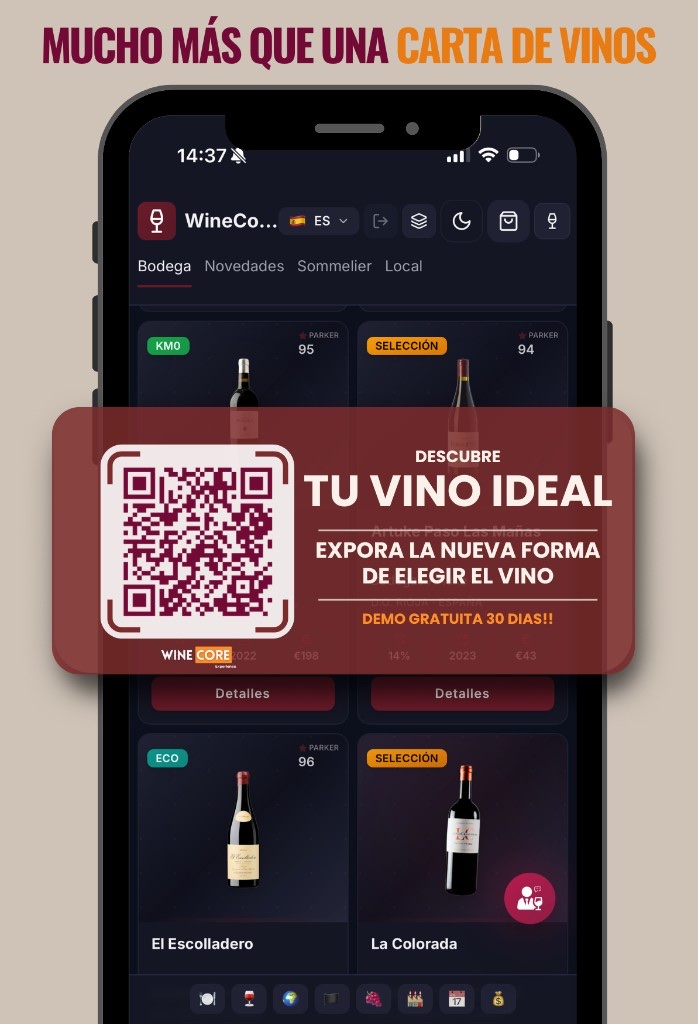
- “Scan and discover which wine best matches your dish”
- “Find your ideal wine in our interactive list”
- “Discover our wine selection”
This kind of message turns the QR into part of the experience, not just a technical shortcut.
What to avoid
Common mistakes when creating a menu QR code
Creating a QR is easy. Creating a good QR menu system for a restaurant takes more care. These are the most common mistakes:
Using a PDF that is not adapted to mobile, or a menu so heavy it takes ages to load.
Uploading the menu to a link that changes with every update, forcing you to reprint every QR.
Printing the QR in low quality, placing it somewhere barely visible or not testing it before printing.
Not updating prices or products, and not offering languages when the restaurant welcomes tourists.
Not highlighting recommendations and never measuring what guests actually browse.
A QR that leads to a static, outdated or hard-to-read menu creates frustration. Guests expect speed and clarity. If they scan and land on a clunky PDF, the experience gets worse.
The reality
The limits of a static QR menu
Many restaurants think that having a QR already means having a digital menu. That is not always true. If the QR only opens a PDF, the restaurant still has a static menu. The only difference is that it is now viewed on a phone.
Limitations of a QR that opens a PDF
- The guest has to zoom in.
- No filtering by product type.
- No recommendations.
- No visibility of featured dishes or wines.
- No personalized experience.
- No sorting by price, style or pairing.
- No easy integration with stock.
- No insight into which products generate interest.
For a small menu this may be enough. But with a large menu — especially one that includes wine — the PDF can become a barrier.
The question is not just “how to create a QR code for the restaurant menu”. The important question is: what experience does the guest get after scanning it?
Evolution
When to move from a PDF to an interactive digital menu
Moving from a PDF to an interactive digital menu makes sense when the restaurant wants to improve the experience, sell better or manage the menu with more flexibility. Some clear signals:
- You change prices or products frequently.
- You have a large wine list.
- You want to highlight recommendations.
- You want to offer pairings.
- You work with several languages.
- You want to hide out-of-stock products.
- You want guests to filter by price, style or wine type.
- You want to analyse which products generate the most interest.
- You want to improve the restaurant's digital image.
- You want to reduce the floor team's burden of explaining the whole menu.
In these cases, the QR should be just the gateway. What matters is the experience behind it.
Wine
QR codes for wine lists: a special opportunity
The wine list is one of the areas where a digital experience can add the most value.
Many guests feel insecure when choosing wine. They do not know every appellation, do not always understand grape varieties and do not want to get it wrong in front of the table. When the wine list is presented as a long roll of names, wineries, vintages and prices, the guest can freeze.
A well-used QR can greatly improve this experience if it leads to a clear, visual, guided wine list. For example, a digital wine list can let guests search by:
- Wine type.
- Price.
- Grape.
- Appellation.
- Pairing.
- Style.
- Intensity.
- Restaurant recommendation.
- Wines by the glass.
- Available wines.
This helps guests choose with more confidence and also helps the restaurant sell its references better.
The experience
How to turn the QR into a WineCore experience
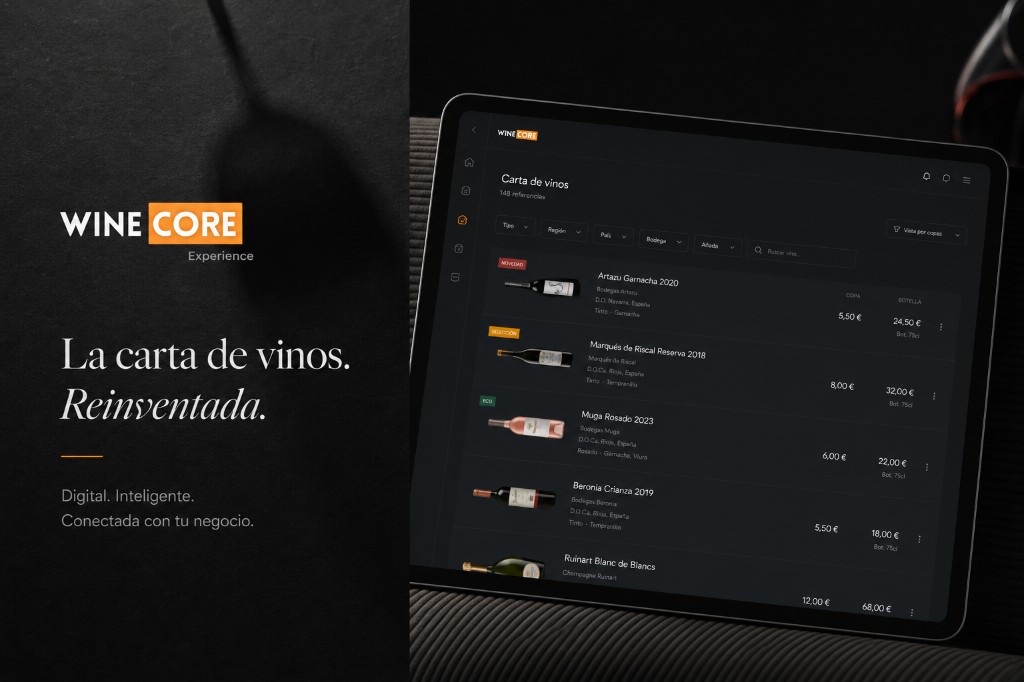
WineCore Experience goes beyond the traditional QR. Instead of sending the guest to a static list, it transforms the QR access into a digital experience designed to help the guest choose wine.
The QR is still the entry point, but the difference lies in what happens next.
With a static list
The guest scans and reads. They get the same flat list as always, with no filters, no recommendations and no help deciding.
With a WineCore experience
The guest scans, explores, filters, discovers and decides with more confidence. The list becomes an active guide through the choice.
This lets the restaurant present its wine list more visually, highlight recommendations, make pairings easier and turn a complex selection into a more intuitive experience.
WineCore does not replace the floor team. It supports them. It helps guests arrive better informed and makes it easier for waiters to recommend. Instead of using the QR as a mere technical shortcut, the restaurant can use it as a sales and differentiation tool.
Before printing
Checklist for a good restaurant menu QR code
Before printing your QR, review this list. It can prevent most of the usual problems.
Checklist: a menu QR ready to print
Tick each point as you review it. You can download it as a PDF.
Organization
Practical example of a QR menu structure
A restaurant can organize its digital menu like this:
General menu
- Starters
- Main courses
- House specialities
- Desserts
- Drinks
- Wines by the glass
- Wine list
- Daily menu
- Recommendations
- Allergens
- Languages
Inside the wine list
- Sparkling
- Whites
- Rosés
- Reds
- Sweet & fortified
- Wines by the glass
- Restaurant recommendations
- Wines for pairing
- Premium selection
The key is for guests to find what they are looking for within seconds. If they have to scroll endlessly or open a huge PDF, the experience loses its impact.
FAQ
Frequently asked questions about restaurant menu QR codes
How do you create a QR code for a restaurant menu?
To create a QR code for a restaurant menu, you first need the menu in digital format and uploaded to a URL. Then you can use a QR code generator, enter the link, download the QR in good quality, test it on several phones and print it on visible supports for tables or other areas of the venue.
Can I create a free QR code for my menu?
Yes, there are free QR generators. However, check that the code does not expire, that the URL is stable and that you can download it in good quality. For professional use, it is advisable to keep full control of the destination link.
Is a PDF or a digital menu better?
A PDF can be enough for a simple menu with few changes. But if the restaurant wants to update prices, highlight products, offer several languages, work with a wine list or improve the guest experience, an interactive digital menu is usually the more professional option.
What size should a QR code be on the table?
The QR should be large enough to scan easily, normally at least 3 to 5 centimetres on table supports. It should also have good contrast, a margin around it and be placed in a visible spot.
Where should you place the menu QR code?
The QR can be placed on table tents, acrylic stands, printed menus, table stickers, the bar, the restaurant entrance or the terrace. What matters is that it is visible and that guests immediately understand they should scan it to see the menu.
What happens if I change the menu?
If the QR points to a stable URL, you can change the menu content without modifying the QR. That is why it is better to avoid links that change every time you upload a new file. Ideally, keep the same URL and update the content behind it.
Does the QR replace the physical menu?
Not necessarily. Many restaurants combine a physical menu and a digital menu. The QR can act as support to show extended information, the wine list, allergens, languages, photos or recommendations.
Can a QR code help sell more wine?
Yes, if the QR leads to a well-designed wine list. A digital list can help guests filter by style, price, pairing or wine type, making the choice easier and reducing the fear of getting it wrong.
Conclusion
The value lies in what happens after the scan
Creating a QR code for a restaurant menu is easy. What matters is deciding what experience you want to offer after the scan.
If the QR leads to a static, hard-to-read PDF, you will have digitized the access — but not necessarily the experience. If, on the other hand, the QR leads to a clear, updated, visual and interactive menu, it can become a real tool to improve service and increase sales.
For a general menu, the QR brings convenience. For a wine list, it can bring much more: guidance, confidence, recommendation and a more engaging experience for the guest.
Beyond the QR
WineCore Experience was created precisely to transform that moment. The guest scans the QR, but does not land on a plain list of wines. They find a digital wine list designed to help them choose better, discover new references and enjoy the restaurant experience more.
Because the real value is not in having a QR. It is in what happens after scanning it.